How to copy events
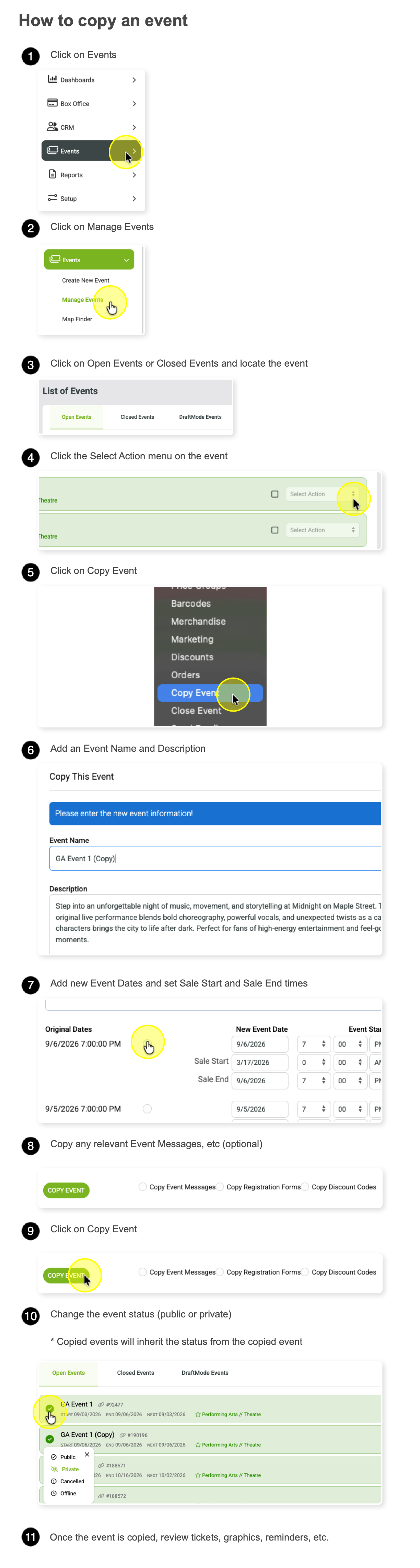
This help doc explains how to speed up event setup by copying an existing event.
Since copying an event carries over many of its settings, be sure to review all details to ensure they are correct for your new event.
After copying the event, it is recommended to reapply a pricing template. When applying the template, select “Delete Unsold Seats” so the event reflects your current pricing.
Helpdoc: Re-Apply Pricing Template
When copying an event, the new event will inherit the original event’s status
(Public or Online).
Helpdoc: Event status (public, private, offline, or canceled)