Early Access Setting for Subscribers
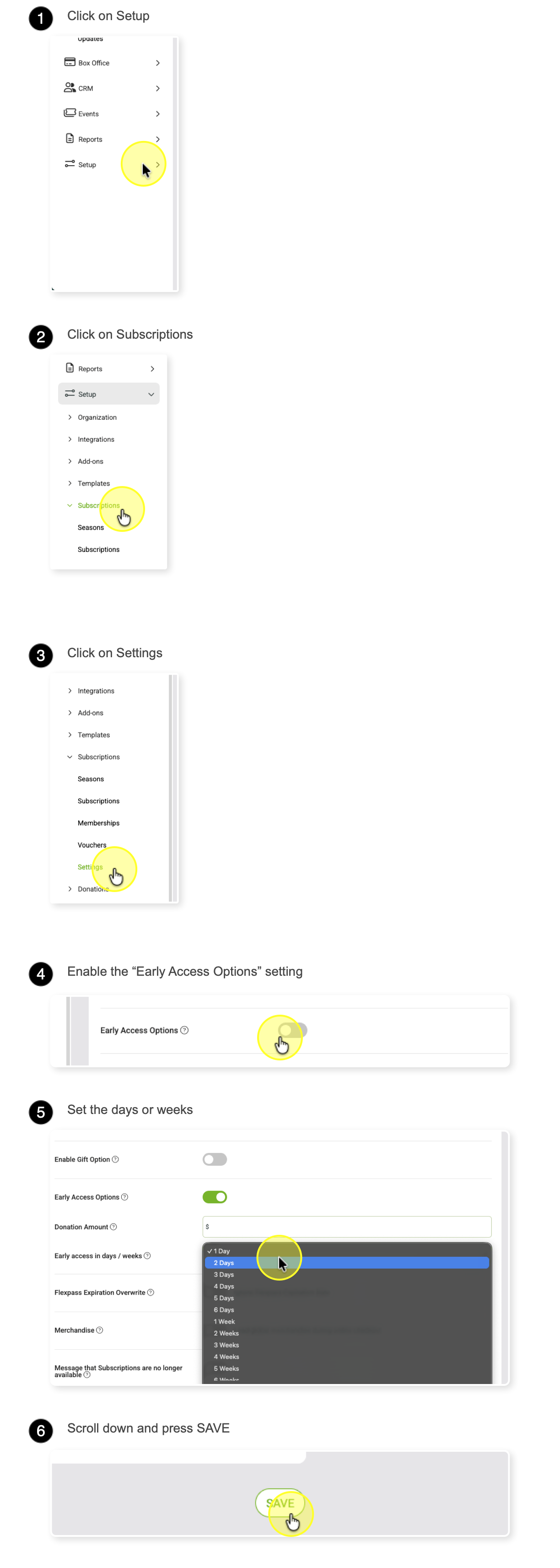
You can give subscribers early access to tickets by navigating to:
SETUP > SUBSCRIPTIONS > SETTINGS
In the Early Access Options section:
- Check the box to enable early access.
- Choose how far in advance subscribers can purchase tickets.
Early access is calculated based on the event’s public on-sale date and time.
Example:
If the public on-sale is set for 8:00 a.m. and early access is granted 1 day in advance, subscribers will be able to purchase tickets starting at 8:00 a.m. the day before.
Notes
- Flex Pass subscriptions will also unlock tickets when this setting is enabled.
- (Optional) Set a minimum annual donation amount that subscribers must meet to receive early access. To allow all subscribers access, leave this amount set to $0.
See the navigation steps below to configure the early access for subscribers setting.