Updated Event Manager Navigation
We’ve updated the platform navigation to make it easier to find tools and reduce clutter as the platform continues to grow. While most of the navigation will feel familiar, some areas—especially Setup and Events—have been reorganized to group related tools together.
No functionality has been removed. If something looks different at first, Global Search is the fastest way to find what you need and jump directly to the correct screen.
What’s Changed (at a High Level)
The updated navigation focuses on:
Clearer grouping of related tools
Fewer items in global settings
Moving configuration options closer to where they’re used day to day
These changes are designed to make the navigation easier to scan and more intuitive over time.
Changes to Setup
The Setup area has been simplified by moving some settings closer to the areas they support.
CRM settings now live within the CRM area
Box Office settings now live within the Box Office area
Event Settings now live within the Events area
This keeps Setup focused on global configuration while making frequently used settings easier to locate.
Changes to Events
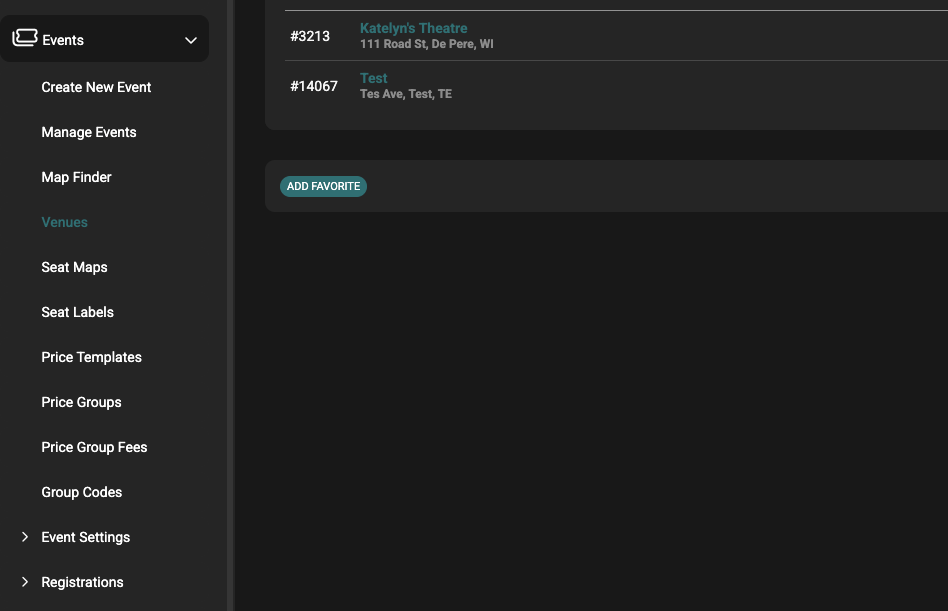
The Events area now includes more of the tools used for event setup and pricing.
Event-related configuration tools—such as:
Pricing templates
Seat maps
Price groups
Registrations
are now grouped under Events. This keeps event creation, pricing, and management tools in one place.
Finding Tools Quickly with Global Search
If you’re unsure where something lives in the new navigation, use Global Search. You can search for:
Navigation items
Events
Patron accounts
Orders
Global Search allows you to jump directly to the correct screen without needing to know the exact menu location.