Affiliate Links
This article explains how to add an affiliate (referral) code to your sales URL. A referral code lets you track sales that come through a specific link.
Creating a Code
When choosing a code, use letters and numbers only — no special characters.
Example: david
Creating the Link
- Go to the event page where tickets are being sold.
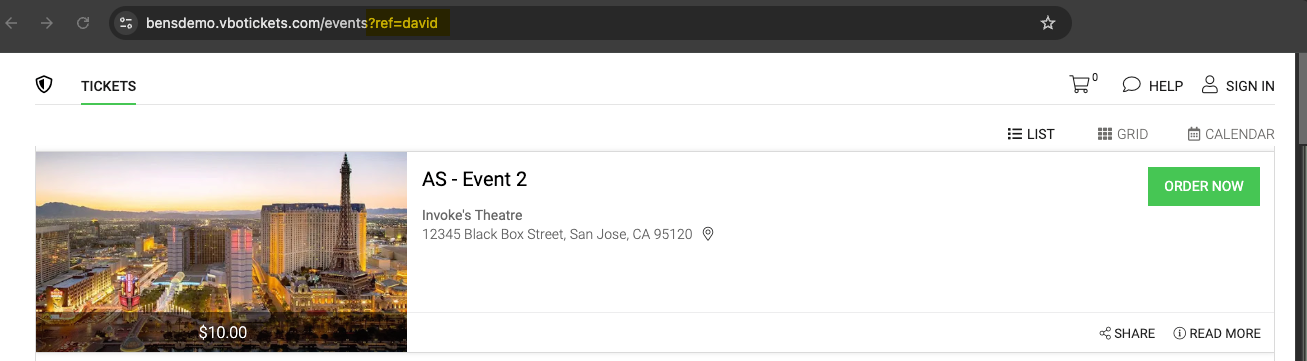
- At the end of the event URL, add: ?ref=CODE
- Replace CODE with the name or code you want to use.
- Example: https://www.yourdomain.com/event-page?ref=david
Press Enter to reload the page. The page will look the same, but now it includes your tracking code.
Testing and Sharing the Link
Do a test purchase using this link to make sure the tracking code is recorded properly.
Then, share the link with anyone you want to track, such as an affiliate or partner. When someone buys tickets using that link, the purchase will be tracked under that referral code.
Viewing the Results
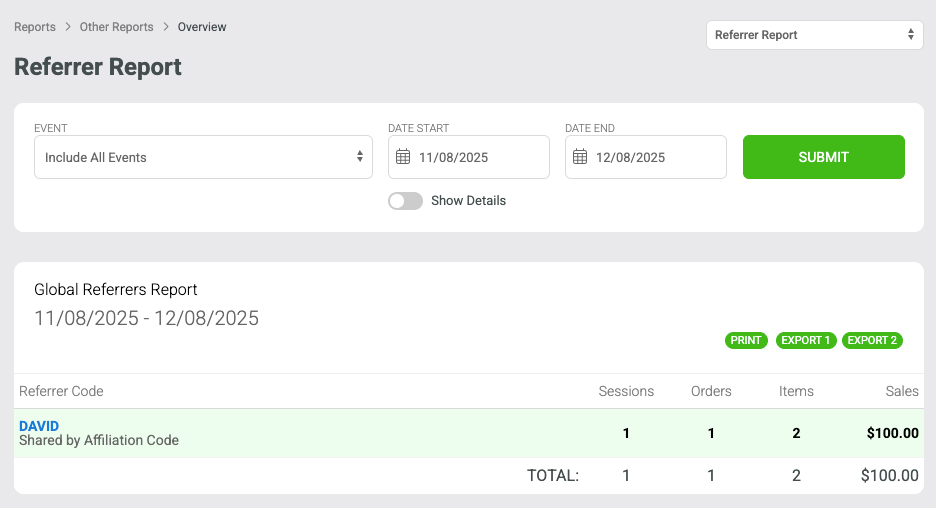
In VBO, go to Reports > Other Reports > Refer Report
Select include all events or select your event and set the date range.
Click Show Details (optional) and then select Submit.
You’ll see each referral code, along with the number of sales and total amount generated.