E-Ticket Delivery Message / Instructions / Footer
This doc will cover how to modify the eTicket delivery description, instructions, or footer.
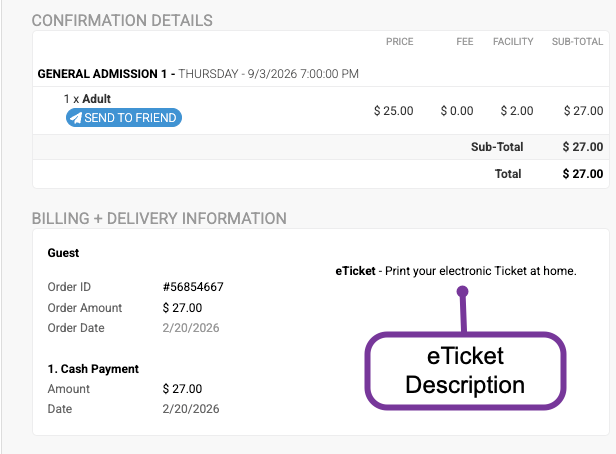
The eTicket delivery description is displayed on the order confirmation:
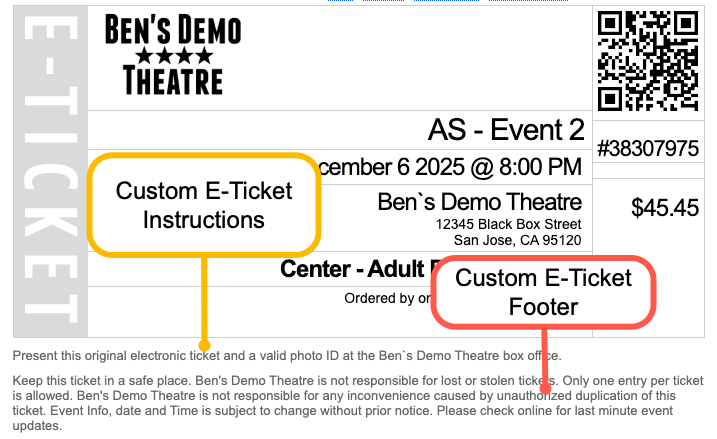
The instructions and footer are displayed on the eTickets.
To edit, go to EVENTS > EVENT SETTINGS > DELIVERY SETTINGS From this screen, override the desired elements and press SAVE.
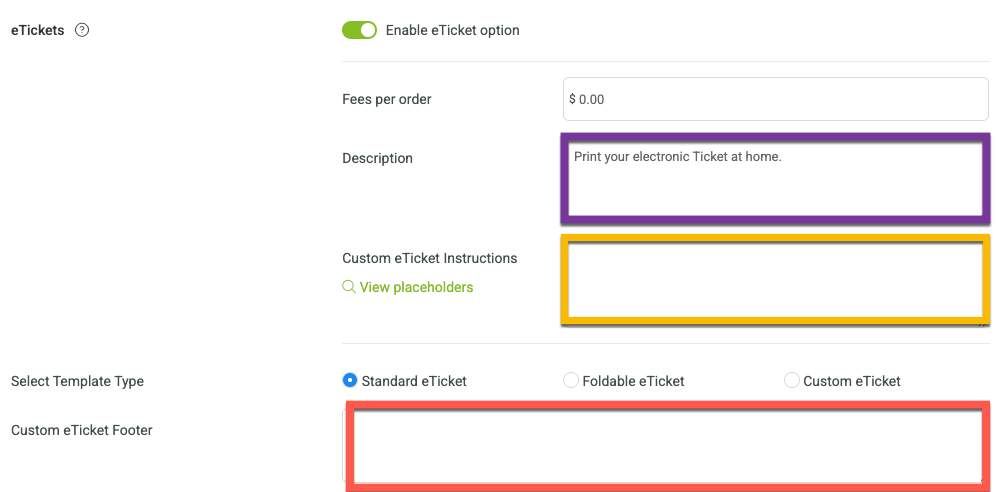
Placeholders can applied to the Custom eTicket Instructions area.
Use any of the following placeholders to customize the instructions.
Placeholder | Description | Display |
{EVENTDATE} | Date of the event | Thu September 3 2026 @ 7:00 PM |
{EVENTDAY} | Day of the event | Thu September 3 2026 |
{EVENTDATESHORT} | Standard representation of the event date | 9/3/2026 |
{EVENTDATENOTIME} | Event date without time | Thu September 3 2026 |
{EVENTDURATION} | The length of the event in hours | 3 |
{EVENTTIME} | The time of the event itself | 7:00 PM |
{EVENTENDTIME} | The time when the event ends | 10:00 PM |
{DOORSOPEN} | The time when event is open to customers | 5:25 PM |