Troubleshoot: Standard Subscription
Subscriber Code Not Working
If a subscriber code is not working, it’s usually due to one of the following:
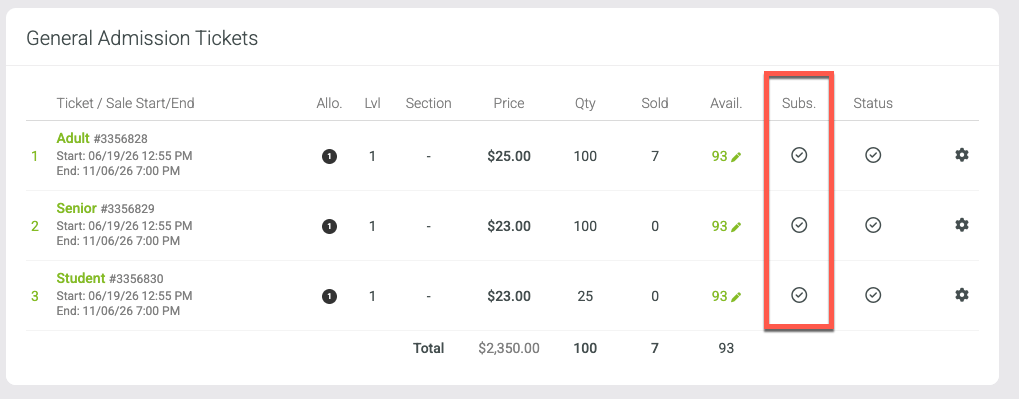
Subscription is not activated at the ticket level for that event date
Open the event’s Tickets page in the back end and confirm that the subscription is activated for the applicable ticket type.
Click the + symbol next to the ticket.
Activate the subscription or membership that should be allowed to access that ticket.
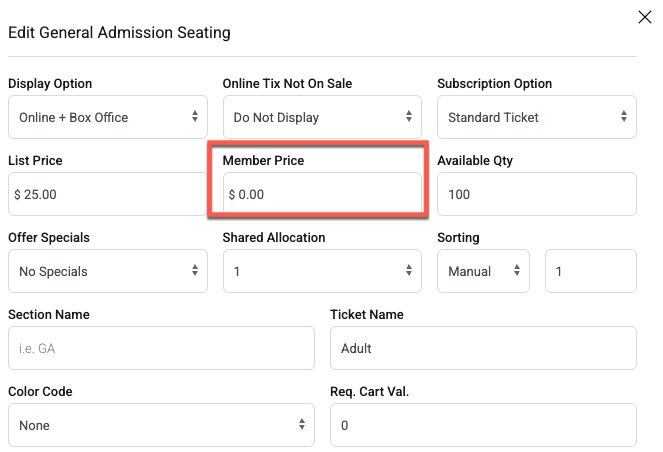
Member pricing is set on the subscription
Open the ticket menu where pricing is configured and review the Member Price.
If the patron should receive a free ticket, make sure the member price is set to $0.00.
Other Possible Reasons
The subscription has an invalid date range.
The patron already has tickets for that event/date from another transaction.
If you have reviewed the items above and the code is still not working, please submit a support ticket and include the subscriber code, event, event date, and ticket type you are trying to validate so our team can review the issue.